

Freight Broker Accounting Software: Invoicing to Paid, Inside Your TMS
Invoices, carrier bills, AR/AP, and commissions flow from the load record itself, with margin live on every load. Native books, or a two-way QuickBooks sync. Nothing entered twice.
Your loads live in one system. Your money lives in another.
Operations closes the load in the TMS. Then someone re-keys the same invoice into the accounting system, enters the carrier bill again, and marks the payment in two places. Two systems, two versions of the truth, and a month-end spent hunting down why they disagree.
A brokerage's cash flow is made or lost between delivered and paid. UltraShip's freight accounting software keeps that whole span in one system, load to ledger: no double entry, no reconciliation hunt, no invoice sitting in a folder.
One load. One ledger. From delivered to paid.
The load record your team already built becomes the invoice, the carrier bill, the commission, and the margin. Nothing re-keyed, nothing reconciled, one live record.
Load delivered
The load closes operations with its POD and carrier documents already attached. Accounting starts with a complete file.
Charges locked
Line haul, accessorials, and every other charge already sit on the load, entered once and priced for both sides.
Invoice created
The shipper invoice is generated from the load data with its documents attached. Nothing is re-keyed into a second system.
Invoice sent, on record
The invoice goes out and lands back on the load record, dated, filed, and findable when the shipper calls.
Not invoiced, visible
Delivered loads still waiting to bill show up in one view, so revenue never sits in a folder while it ages.
AR aging watched
Every open invoice ages in plain sight, by shipper and by load, so collections start on time, not at month end.
Payment applied
The shipper's payment posts against the invoice and the load, and the receivable closes exactly where it started.
Carrier bill in
The carrier's invoice lands on the same load, right beside the rate con it came from, so nothing gets paid blind.
Carrier settled
AP is tracked and settled from the load record, so what you owe carriers never lives in a separate list.
Commissions calculated
Commission is calculated live from the load's real margin, on rules you set per rep, not a month-end spreadsheet.
Margin closed
Revenue in, carrier cost out, commission counted: the load closes with its true margin live on the record.
Books in sync
Run your books natively in UltraShip, or two-way sync invoices, bills, and payments with QuickBooks.
NewLaunched at F3 2026
New: pay carriers from the load
UltraPay and multicurrency close the loop from the invoice to the carrier payment.
 NewUltraPayPay the carrier bill by ACH, instant payment (RTP) or wire, with the status and a reference on every payment.See it in the platform →
 NewMulticurrencyBill the shipper in USD and pay the carrier in CAD or MXN, with the rate locked at booking.See it in the platform →
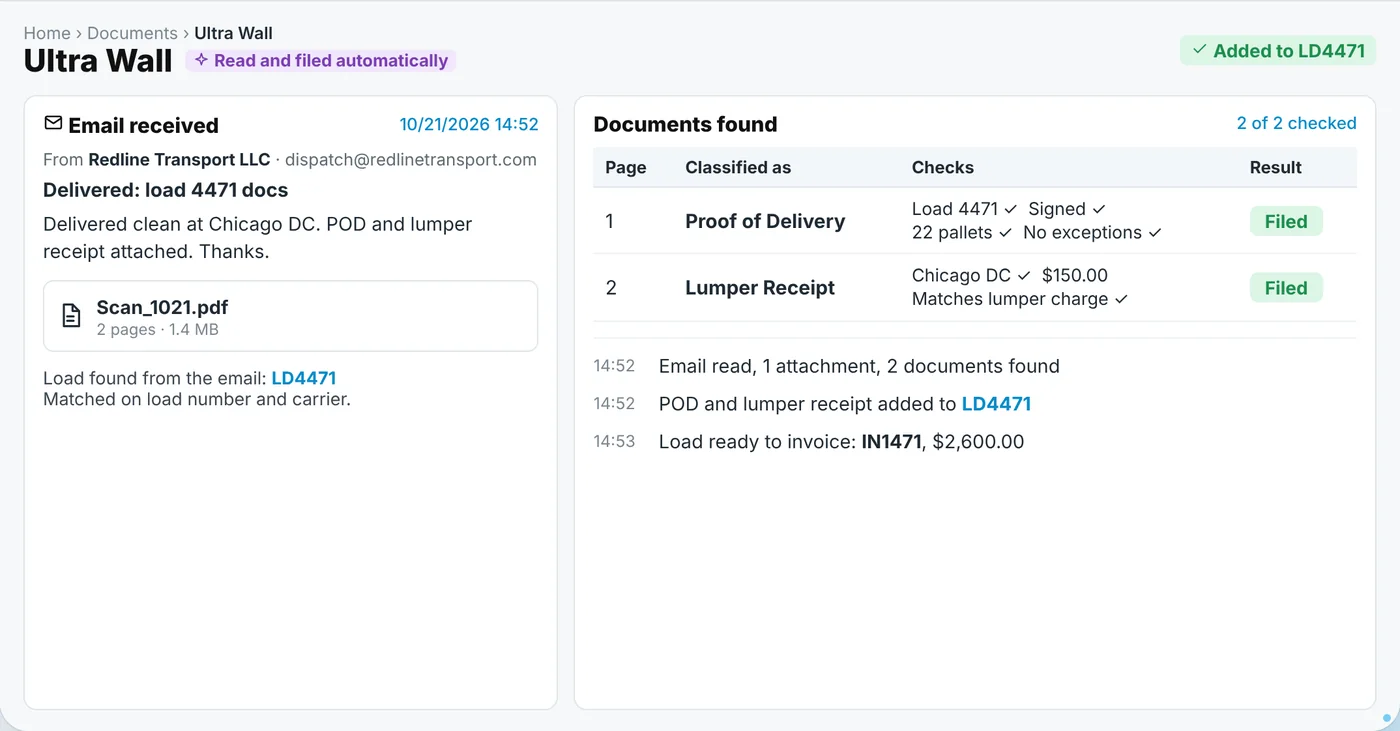 NewUltra WallPODs and receipts are read, checked and filed on the load, so the invoice goes out sooner.See it in the platform →
Where the hours and the cash come back
Freight billing is where a brokerage either compounds cash flow or leaks it, one invoice at a time. Running the books on the load record changes three numbers every owner watches.
No double entry
The invoice, the carrier bill, and the payment are created once, on the load. Nobody re-types them into a second system.
No reconciliation hunt
When operations and accounting share one record, there is no month-end spent explaining why two systems disagree.
No invisible margin
Margin and commission are computed live on each load, so you see profitability now, not after the books close.
Accounting is the last mile of the load, not a separate world
Before an invoice exists there is a load to run, and beside every ledger there is a tool your accountant already trusts. UltraShip's freight broker software runs that whole span, and the accounting module on this page closes it. Every dollar posts to the same record the load lived on.
Before the invoice: the load
Every dollar starts as a load. Create it, cover it, track it, and hand it to accounting on the same screen it was born on.
Load management software →Beside the books: QuickBooks
Keep QuickBooks if your accountant lives there. Invoices, bills, and payments flow both ways automatically, with nothing entered twice.
QuickBooks integration →Around it all: the platform
CRM, compliance, loads, tracking, and reporting write into the same books, because it is one system, not a stack of tools.
See the full platform →Keep QuickBooks. Or run your books without it.
UltraShip's built-in accounting runs invoicing, AR/AP, and commissions natively, no external accounting software required. And if your accountant lives in QuickBooks, a two-way sync keeps invoices, bills, and payments matched in both places automatically. DAT Convoy, Truckstop, Highway, MyCarrierPortal, RMIS, and TruckerTools connect the rest of the operation, so the books draw from one source of truth.
Built for how brokerages actually run
UltraShip replaced our spreadsheets and disconnected tools with one workflow that actually makes sense. More control, fewer misses, and faster execution without enterprise-level cost.
It keeps everything in one place: loads, carriers, tracking, and invoices, so nothing slips through the cracks. Clean, fast, and it makes day-to-day brokerage operations way easier.
UltraShip helped our sales team stay organized and move faster, from shipper follow-ups to quoting and booking. It is the first system that actually feels built for how brokers sell and execute every day.
Accounting built in, not an add-on bill
UltraStart
Everything you need to run a lean, efficient brokerage.
Book a Demo- ✓ Accounting, invoicing & e-docs
- ✓ Load management & tracking
- ✓ Built-in CRM & shipper pipeline
- ✓ Basic reporting
UltraSuper
Advanced tools for brokerages ready to compete higher.
Book a Demo- ✓ Everything in UltraStart
- ✓ CarrierQ™ FTL & LTL capacity
- ✓ Compliance & digital onboarding
- ✓ AI reporting & custom roles
UltraEnterprise
Built for brokerages scaling without limits.
- ✓ Everything in UltraSuper
- ✓ Inbox Intellect & UltraAsk
- ✓ Data migration support
- ✓ Dedicated implementation
No contracts. No setup fees. No separate accounting tool. See full pricing →
Freight broker accounting questions
Freight broker accounting software runs the money side of a brokerage: shipper invoicing, carrier bills, AR and AP aging, commissions, and margin per load. In UltraShip it is a module of the TMS, so every entry starts from the load record instead of being re-keyed into a separate system.
No. UltraShip's accounting is built in, so a brokerage can run invoicing, AR and AP, commissions, and reporting natively without any external accounting software.
Yes, in both directions. If your accountant works in QuickBooks, UltraShip keeps invoices, bills, and payments synced two ways, so nothing is entered twice and the two systems never drift apart.
From the load. Once the load is delivered and its documents are in, accounting generates the invoice from the charges already on the record and sends it with the paperwork attached. Nothing is re-keyed into a second system.
Yes. Delivered loads that have not been invoiced yet show up in one view, so revenue does not sit uncollected while the paperwork waits in a folder.
Yes. Open shipper invoices age in plain sight by customer and by load, and carrier bills are tracked and settled from the same records, so collections and payments both run on time.
Commission rules in UltraShip are fully customizable per rep, so every rep can run on a completely different structure. Payouts are calculated live from each load's actual margin, straight from the books rather than a month-end spreadsheet.
Yes, live. Revenue, carrier cost, and commission sit on the load, so its margin is visible the moment anything changes and rolls straight into Performance Report.
No. Built-in accounting is core UltraShip, included in every plan with no contracts and no setup fees. Invoicing, AR and AP, and commissions are part of the platform, not add-ons, and UltraShip does not charge integration fees for the QuickBooks sync.
Watch your books run from the load record
on your real freight
Every invoice, every carrier bill, every commission: one system, from delivered to paid.
Book a Demo →