

Highway carrier identity,built into onboarding
UltraShip is an official Highway partner. Connect Highway once, and its identity checks and risk flags land on the carrier record inside UltraShip. Invite, onboard, vet and approve the carrier from UltraShip alone, without logging into Highway.

Does UltraShip integrate with Highway?
Yes. UltraShip is an official Highway partner. Once Highway is connected, its carrier identity checks, risk flags and insurance and authority monitoring show on the carrier record inside UltraShip. Brokers onboard, vet and approve carriers entirely from UltraShip, and every change is logged on one dated record.
AT A GLANCE
- ✓Official Highway partner, listed on Highway's partner page
- ✓Highway checks and monitoring land on the UltraShip carrier record
- ✓Onboard and approve from UltraShip, no Highway login needed
Stop fraud before the load moves
Verify identity
Highway checks carrier identity as part of onboarding in UltraShip, not in a separate portal.
Flag risk before booking
Potential risk shows up before the carrier is approved and booked.
Keep a dated record
Risk assessment, packet status and approval changes are logged with who made them and when.
How Highway works in UltraShip
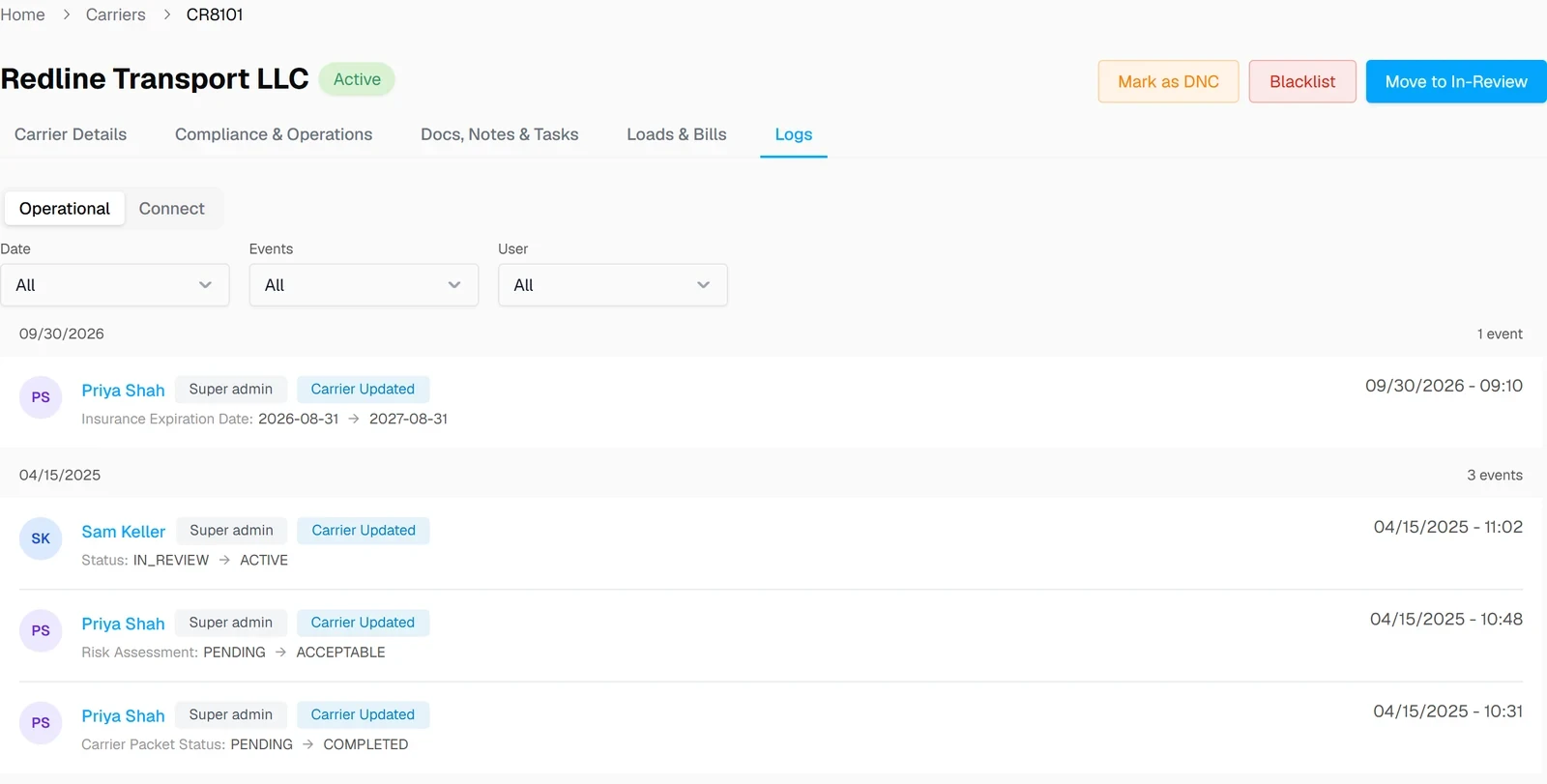
Screens from UltraShip, shown with demo data.
Onboard the carrier
The carrier goes through UltraShip's digital onboarding, with Highway's identity checks built in.

Review risk and approve
Risk assessment and status changes land in the carrier's Logs tab, dated and attributed.
Book with confidence
Approved carriers show up in CarrierQ™ for the lane, ready to book.

What moves between Highway and UltraShip
| Data | Direction | Where you see it |
|---|---|---|
| Carrier identity verification | Highway → UltraShip | Carrier onboarding |
| Potential risk flags | Highway → UltraShip | Before booking |
| Risk assessment, packet status, approval history | Stays in UltraShip | Carrier record, Logs tab |
What changes for your brokerage
Without the integration
- ✕Check identity in a separate portal
- ✕Copy results into the carrier file by hand
- ✕No single dated record of who approved what
With Highway in UltraShip
- ✓Identity checks inside onboarding
- ✓Risk visible before booking
- ✓Every change logged on one record


 CarrierView
Highway integration questions
Is UltraShip an official Highway partner?
What does the Highway integration do?
Where do I see the results?
Does Highway replace UltraShip's own vetting?
Do I need my own Highway account?
Do I need to log into Highway to onboard a carrier?
Does UltraShip charge for the Highway integration?
See Highway vetting inside UltraShip
A 15-minute demo of onboarding a carrier, start to approval.